Connector Configuration
|
In some scenarios, it can be useful to provide a system property or an environment
variable within a configuration value. For example, you might want to distribute multiple
connector instances over different containers and have certain configured parameters
adapted according to specific system properties or environment variables, respectively. You
can do this by providing a placeholder of the form However, for security reasons this replacement is disabled by default. A malicious user could misuse this feature to obtain sensitive information about the connector environment such as the host’s operating system, the user under which the connector is running etc. You can mitigate this issue e.g. by restricting the access to the connector UI. If you want to enable the resolution of system properties and environment variables,
set the system property |
File System Configuration
Configuration Options related to defining the paths to traverse.
File System Sources
The details of which paths to traverse and which files and folders to process.
| Name | Property Key | Description |
|---|---|---|
Start Folders |
|
A list of folders to traverse. |
Traverse Symbolic Links |
|
Enable traversal of symbolic links. |
Enable Filters |
|
Enable filter options for the folders. |
Filter Configurations
Configure one or more filters for the defined start folders.
Folder Filter Settings
| Name | Property Key | Description |
|---|---|---|
Regular Expression |
|
The regular expression the path will be matched against. |
File Filter Settings
| Name | Property Key | Description |
|---|---|---|
Action |
|
When the Filter Rule matches, this action is performed. |
Regular Expression |
|
The regular expression the path will be matched against |
File Size Filter Settings
| Name | Property Key | Description |
|---|---|---|
Action |
|
When the Filter Rule matches, this action is performed. |
Rule |
|
The applied rule. |
File Size |
|
The applied File Size. |
Path Depth Filter Settings
| Name | Property Key | Description |
|---|---|---|
Maximum Path Depth |
|
Maximum path depth allowed. |
Date Index Filter Settings
| Name | Property Key | Description |
|---|---|---|
Date Field |
|
Date field of the Item/Folder. |
Mode |
|
Choose if the filter will be applied on a period or on a specific date. |
Unit |
|
To calculate the relative date take the current date and go back N time. |
Quantity |
|
The amount of units which shall be used to calculate the cut-off date. |
Format |
|
A date format string.E.g.’yyyy-MM-dd’for year-month-day. |
Date |
|
A fixed date of the specified format. |
File System Global Filter Settings
Filter Options related to all configured Start Folders.
| Name | Property Key | Description |
|---|---|---|
Index Folders |
|
If Setting is enabled then the information of folders will be indexed too. |
Max Content Size |
|
The Maximum Content Size of all files. Files that exceed this size will only have their metadata indexed. A Greater-Than-Filter defined in a Source will override this global content filter. |
Amazon Kendra Configuration
Instance Configuration
Configuration options related to specifying the target Kendra Index and Data Source including authentication/authorization settings.
| Name | Property Key | Description |
|---|---|---|
Index ID |
|
ID of the target index. It can be retrieved in your AWS management console under |
Region ID |
|
ID of the region where the index is deployed. One of us-east-1(N. Virginia), us-east-2(Ohio), us-west-2(Oregon), eu-west-1(Ireland), ca-central-1(Canada), ap-southeast-1(Singapore) or ap-southeast-2(Sydney) is available. |
Amazon Resource Name |
|
ARN of the IAM Service Role assigned to the index. It can be retrieved in your AWS management console under |
Data Source ID |
|
ID of the Custom Data Source Connector added to target index. All documents and groups processed by the connector will be attached to this data source. It can be retrieved in your AWS management console under |
Use System Credentials |
|
To authenticate against Amazon Kendra, you must provide your AWS Access Key and AWS Secret Access Key. If - Java System Properties - Environment Variables - Web Identity Token credentials from System or Environment Variables - Credentials Profile File at location - Credentials delivered through the Amazon EC2 container - Instance profile credentials delivered through the Amazon EC2 metadata service + image::2.0.x@amazon-kendra-backend:ROOT:kendra-use-system-credentials.png[Kendra Use System Credentials] |
Access Key |
|
If |
Secret Access Key |
|
Secret Key of the specified AWS account. The value will be stored encrypted by the connector. |
Assume Role |
|
Enable this option to fetch the security token from STS using the provided role. |
STS Assume Role Region |
|
Region ID for invoking the regional STS endpoint when requesting the service. |
STS Assume Role Amazon Resource Name |
|
ARN of the role which should be assumed by the configured role or account in the instance settings. |
STS Assume Role Session Name |
|
Arbitrary session name attached to the session established by the connector and STS for tracking the session. |
STS Assume Role Session Duration |
|
Time to live duration for a single session. |
Use Proxy |
|
If enabled, the connection to AWS and Kendra Service will be established through a HTTP/HTTPS proxy. |
Proxy Endpoint |
|
Target proxy URL including protocol, host and port. |
Proxy Authentication |
|
If enabled, the connector uses the specified credentials to authenticate towards proxy. |
Proxy Username |
|
Proxy authentication username. |
Proxy Password |
|
Proxy authentication password. The value will be stored encrypted by the connector. |
Content Processing Configuration (Optional)
Documents with empty content or large content can be rejected by Kendra. In order to fine-tune the behaviour for the processing of these documents, consider to set one of the properties below.
| Name | Property Key | Description |
|---|---|---|
Empty Content Token |
|
Items with unsupported mime types (supported are: |
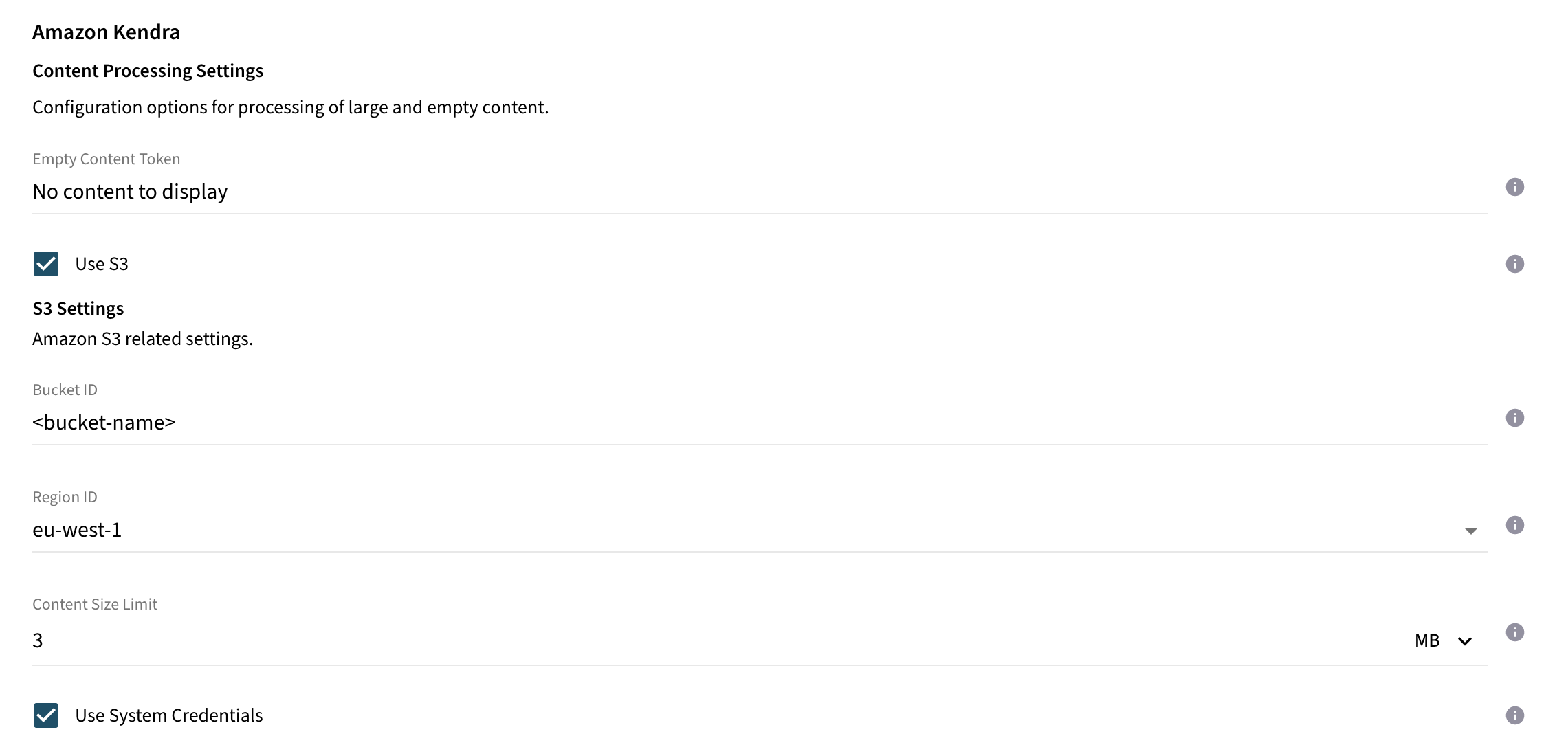
Use S3 |
|
If enabled, binary content of documents exceeding the content size limit will be processed to a S3 bucket. |
Content Size Limit |
|
All documents with content size exceeding this value will be processed to the configured S3 bucket. Else, documents are processed as inline documents including their content directly to Kendra index. If the S3 option is enabled, it is recommended to set the value below 5MB, as this is the limit defined by Kendra for inline documents. |
Bucket ID |
|
ID of the bucket. |
Region ID |
|
ID of the region where the bucket is deployed. One of us-east-1(N. Virginia), us-east-2(Ohio), us-west-2(Oregon), eu-west-1(Ireland), ca-central-1(Canada), ap-southeast-1(Singapore) or ap-southeast-2(Sydney) is available. |
Use System Credentials |
|
To authenticate against Amazon S3, you must provide your AWS Access Key and AWS Secret Access Key. If - Java System Properties - Environment Variables - Web Identity Token credentials from System or Environment Variables - Credentials Profile File at location - Credentials delivered through the Amazon EC2 container - Instance profile credentials delivered through the Amazon EC2 metadata service |
Access Key |
|
If |
Secret Access Key |
|
Secret Key of the specified AWS account. The value will be stored encrypted by the connector. |
Assume Role |
|
Enable this option to fetch the security token from STS using the provided role. |
STS Assume Role Region |
|
Region ID for invoking the regional STS endpoint when requesting the service. |
STS Assume Role Amazon Resource Name |
|
ARN of the role which should be assumed by the configured role or account in the instance settings. |
STS Assume Role Session Name |
|
Arbitrary session name attached to the session established by the connector and STS for tracking the session. |
STS Assume Role Session Duration |
|
Time to live duration for a single session. |
Use Proxy |
|
If enabled, the connection to AWS and S3 Service will be established through a HTTP/HTTPS proxy. |
Proxy Endpoint |
|
Target proxy URL including protocol, host and port. |
Proxy Authentication |
|
If enabled, the connector uses the specified credentials to authenticate towards proxy. |
Proxy Username |
|
Proxy authentication username. |
Proxy Password |
|
Proxy authentication password. The value will be stored encrypted by the connector. |
S3 Content Processing How-To
Use this section if you want the connector to upload large documents to S3 and only reference them in Kendra.
-
Required permissions The connector needs write access to the bucket. The Kendra index role needs
s3:GetObjectto read the uploaded objects. -
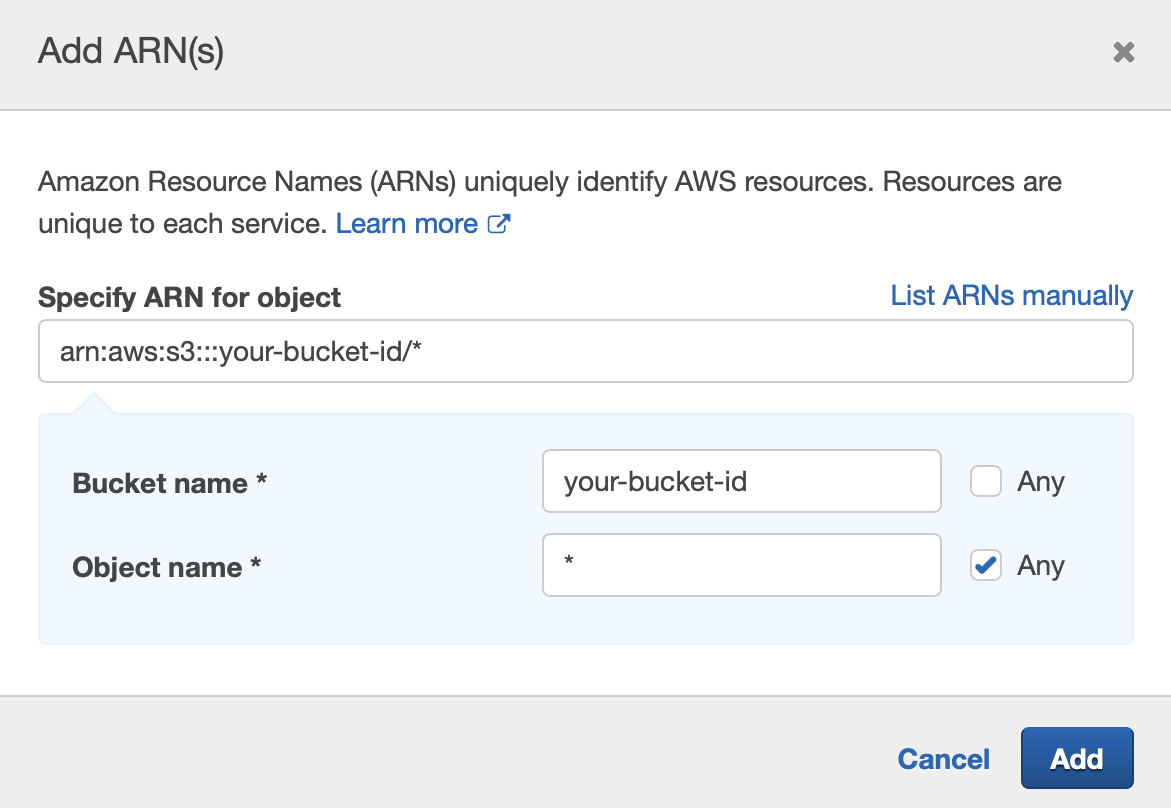
Example bucket policy (adjust
bucket-nameand role ARN)
{
  "Version": "2012-10-17",
  "Statement": [
    {
      "Sid": "AllowKendraRead",
      "Effect": "Allow",
      "Principal": {
        "AWS": "arn:aws:iam::123456789012:role/your-kendra-index-role"
      },
      "Action": ["s3:GetObject"],
      "Resource": "arn:aws:s3:::bucket-name/*"
    },
    {
      "Sid": "AllowConnectorWrite",
      "Effect": "Allow",
      "Principal": {
        "AWS": "arn:aws:iam::123456789012:role/your-connector-role"
      },
      "Action": ["s3:PutObject", "s3:AbortMultipartUpload"],
      "Resource": "arn:aws:s3:::bucket-name/*"
    }
  ]
}
-
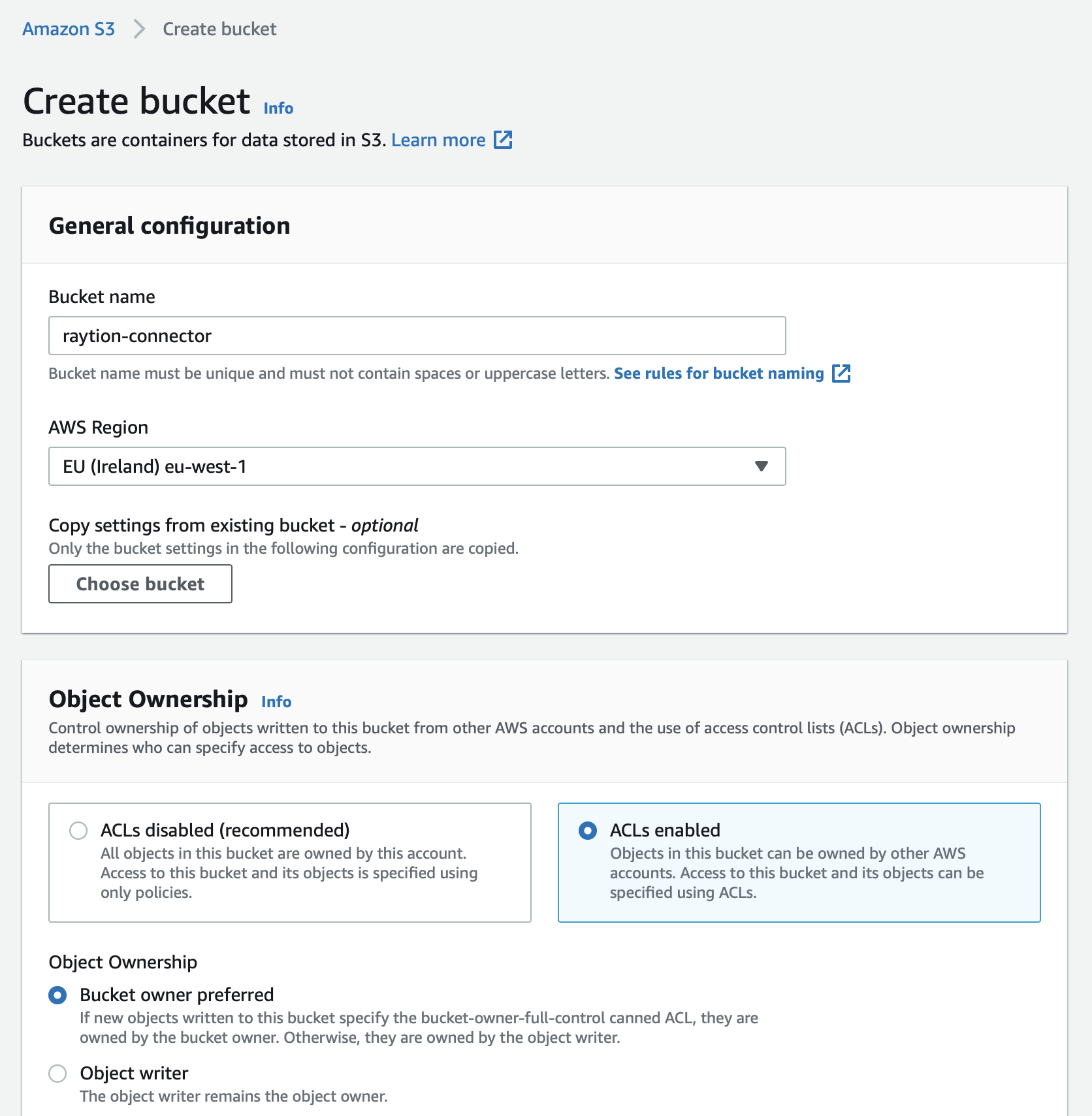
Create a bucket in the same AWS account or a trusted account.
-
Ensure the bucket allows object read access for the Kendra index role.
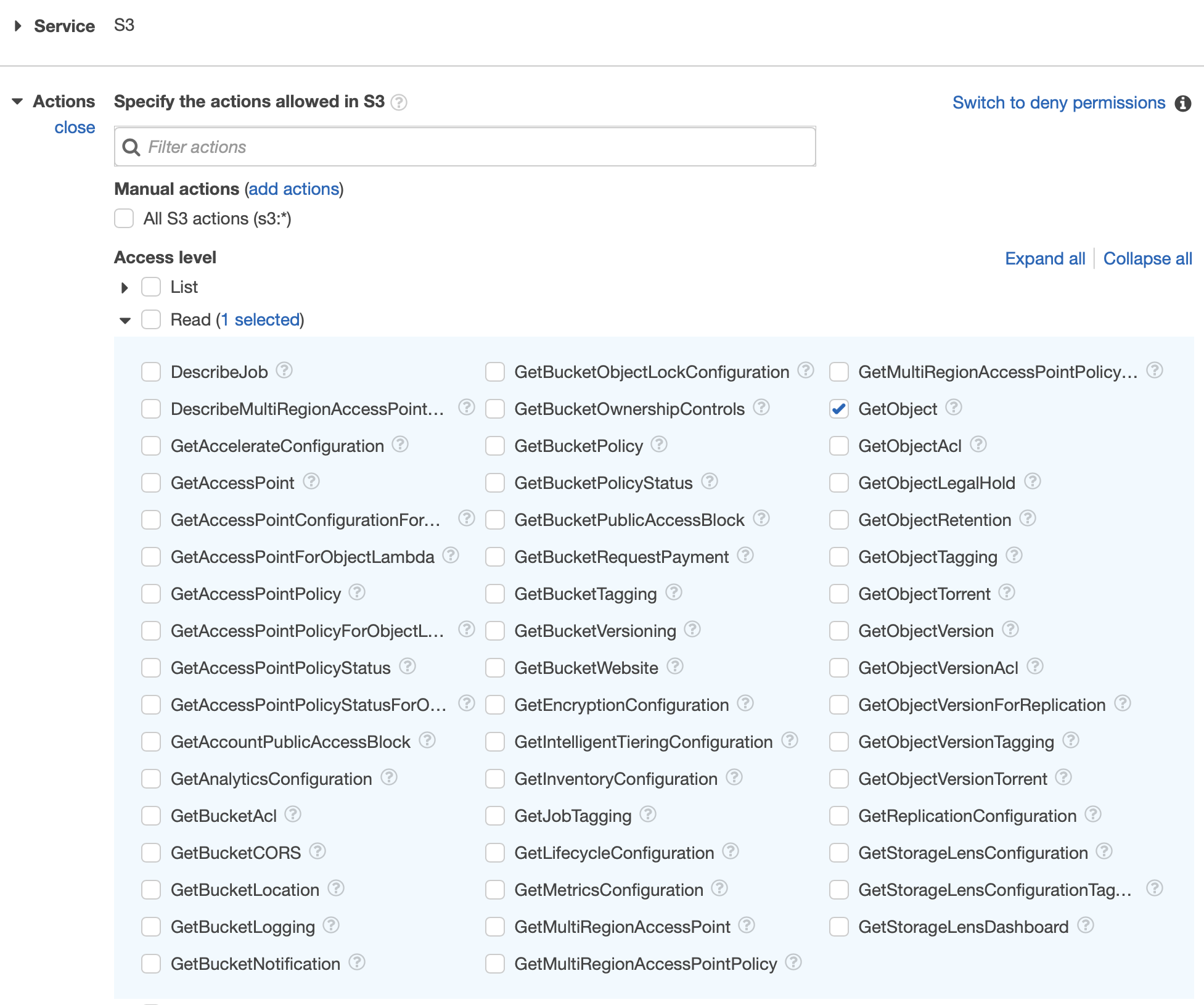
If you manage permissions via IAM policies, attach an S3 policy to the role.
-
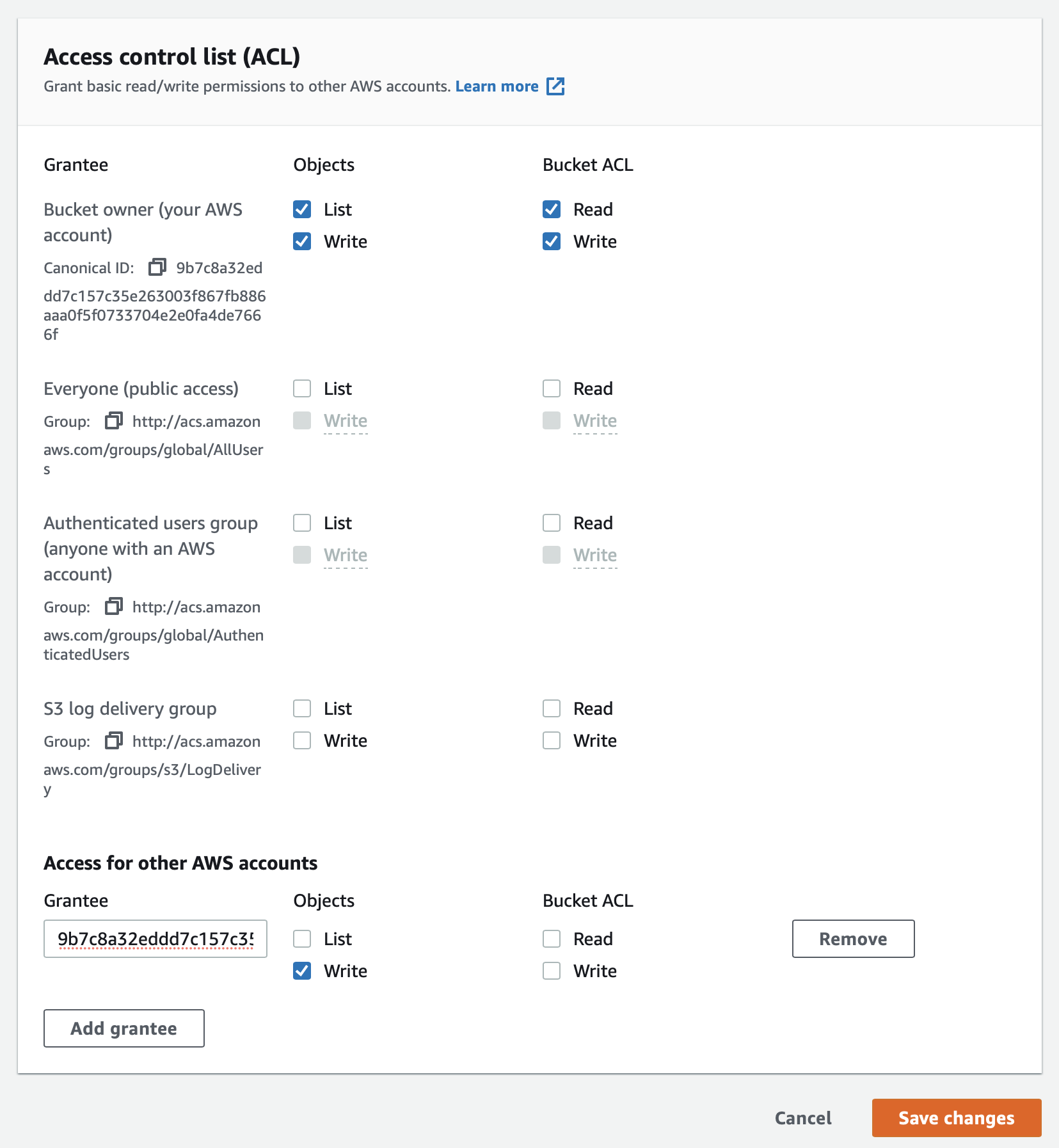
If you rely on ACLs, verify the bucket ACL configuration.
-
Configure the connector’s S3 credentials.
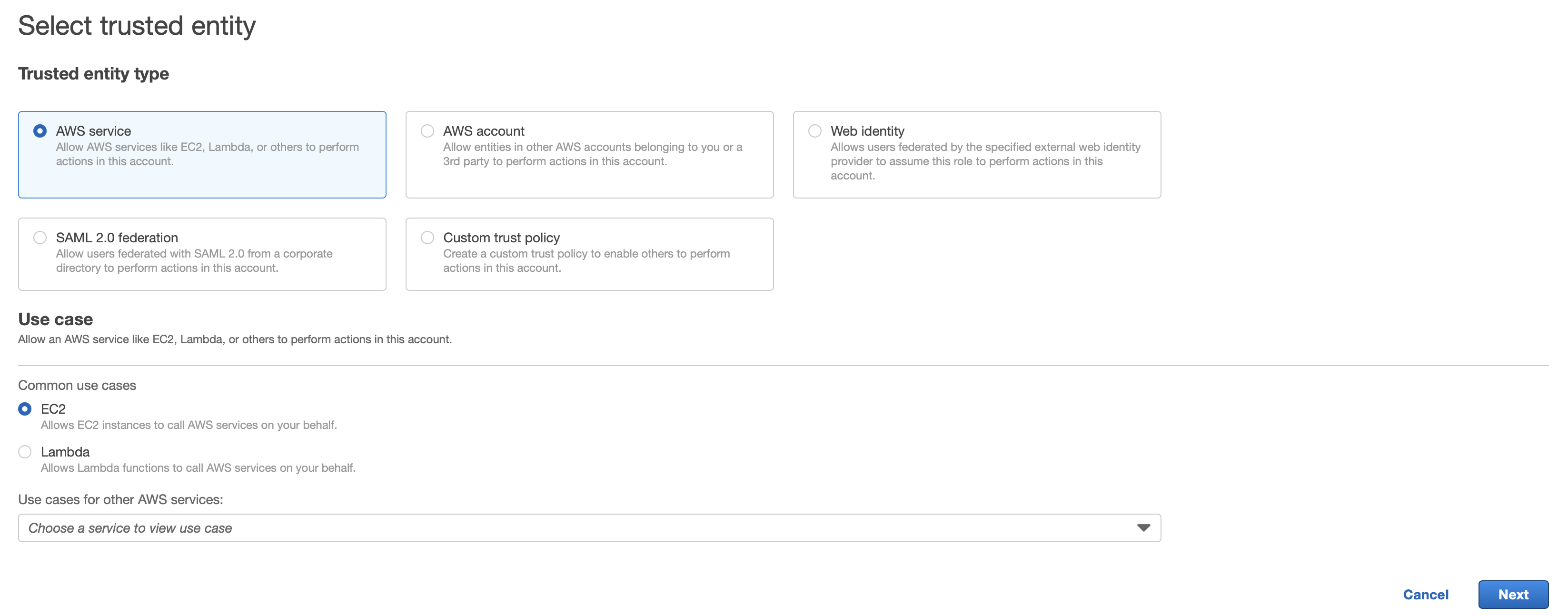
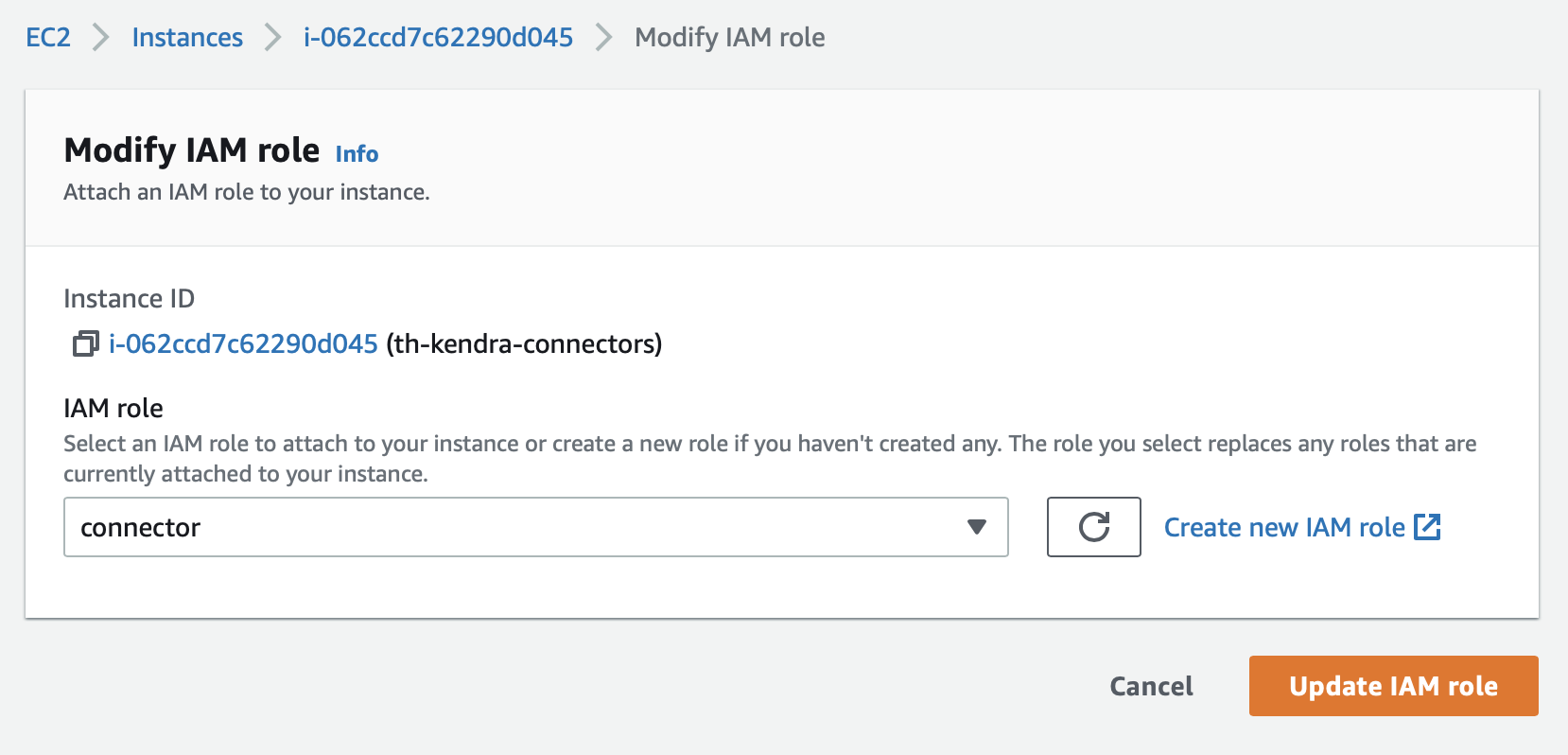
When running on EC2 with system credentials, make sure the instance profile includes S3 permissions.
If you use STS to assume a role, enable
Assume Roleand provide the STS settings.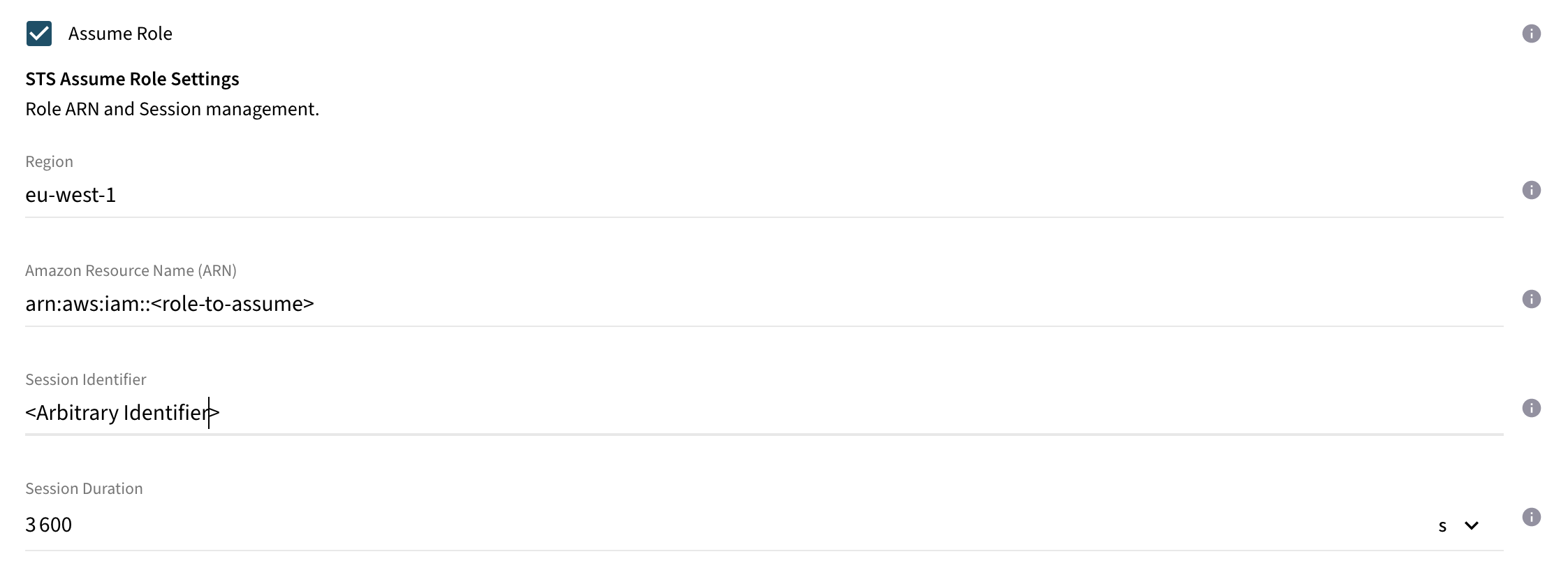
-
Set
Use S3and configureContent Size Limit,Bucket ID, andRegion ID. Documents larger than the limit will be uploaded to S3; smaller ones are sent inline to Kendra.Keep Content Size Limitbelow 5 MB to avoid inline document rejections by Kendra.
Content Batching Configuration (Optional)
Documents are processed in a batch to Kendra. This configuration section includes all batch related properties including the callback behavior.
| Name | Property Key | Description |
|---|---|---|
Max. Size |
|
Max. batch size. All batch put requests will be restricted to this value. The max. allowed value is |
Ignore Processing State |
|
If enabled, the connector submits all documents asynchronously without polling the processing state from Kendra. Documents failed during processing are not recognized by the connector. Unless you would like to monitor the indexing process using Amazon CloudWatch only, it is recommended to disable this option. |
Flush Timeout |
|
Periodic delay between flushing the batch. Within this period, it is guaranteed that the batch is flushed. If the current batch size exceeds the configured max. batch size, only the max. number of items will be flushed in a single cycle. |
Callback Timeout |
|
The Batch API used to index or delete items is asynchronous. The connector is polling the state of the submitted requests to track the state of the items. This property defines the timeout until the connector is expecting the requests to be completed in the asynchronous processing in the search engine. |
HTTP Connection Configuration (Optional)
Configuration options for fine-tuning the Http connection parameters.
| Name | Property Key | Description |
|---|---|---|
Connection Acquire Timeout |
|
Timeout value for acquiring an already established connection from the connector’s connection manager. |
Connection Timeout |
|
Timeout value for establishing a connection to AWS. |
Connection Idle Timeout |
|
Timeout value after an idle connection should be closed. |
Connection Time to Live |
|
Timeout value after the connection should be closed regardless of its current state. |
Max. Number of Connections |
|
Max. number of allowed connections maintained by the connection manager. |
Max. Number of acquired connections |
|
Max. number of requests allowed to wait for a connection. |
General Configuration
Database Configuration
| Name | Property Key | Description |
|---|---|---|
Configuration Type |
|
Supported are PostgreSQL, MS SQL Server, and JDBC URL configuration. |
PostgreSQL
| Name | Property Key | Description |
|---|---|---|
Host |
|
Domain name or IP address of the database server. |
Port |
|
Specifies the port number PostgreSQL is listening on, default is 5432. |
Database Name |
|
Name of the database. |
Username |
|
Username to authenticate with. The regarding user has to have read and write permissions to the database. |
Password |
|
Password of the configured database user. |
Add Custom Parameter |
|
Enables the configuration of additional parameters. |
MS SQL Server
| Name | Property Key | Description |
|---|---|---|
Host |
|
Domain name or IP address of the database server. Instance to connect to on server can be specified by '‹server_name>|<instance_name>'. |
Port |
|
Specifies the port number MS SQL Server is listening on, default is 1433. |
Database Name |
|
Name of the database. |
Username |
|
Username to authenticate with. The regarding user has to have read and write permissions to the database. |
Password |
|
Password of the configured database user. |
Add Custom Parameter |
|
Enables the configuration of additional parameters. |
JDBC URL
| Name | Property Key | Description |
|---|---|---|
URL |
|
JDBC URL for the target database. Out of the box, the connector will use H2 file database. For productive usage, use PostgreSQL specifying the URL in format: |
Username |
|
Database Username to read and write to database. |
Password |
|
Database Password for the specified user |
Traversal Configuration
| Name | Property Key | Description |
|---|---|---|
Traversal History Length |
|
Max. number of traversals to store in the history. Once the limit is exceeded, the connector will automatically remove oldest entries in the history. (default: 100) |
Include Checksum |
|
If enabled, any changes made to the pipeline e.g. configuration, the subsequent incremental run triggers a refeed of all items. |
Change Processing Interval |
|
Interval between change processing traversals. |
Resume on Start |
|
If enabled, any traversals in paused state are automatically resumed after the connector restart. Otherwise, the traversal remains in paused state. |
Number of Traversal Workers |
|
Number of workers to execute the traversal in parallel. Increasing this value might improve the performance, but will footprint higher memory consumption. It is recommended to keep the default value. (default: 10) |
Traversal Job Poll Interval |
|
Interval between the workers to be triggered to fetch and process the next tasks. (default: 10ms) |
Completion Timeout |
|
If the search engine indexes the items asynchronously, there might be some processing still in-flight during the completion process of a traversal. This value specifies the timeout value until all asynchronous callbacks are expected to return before completing the traversal. (default: 10m) |
Executor Size |
|
The executor size restricts the max. number of concurrent running traversals. |
Queue Size |
|
The queue size restricts the max. number of queued traversals. If the value is exceeded, the connector rejects further traversal requests until the queue size is below the configured size. |
Traversal Jobs
| Name | Property Key | Description |
|---|---|---|
Job Timeout Check Frequency |
|
Configures how often the connector checks for timed out jobs. |
Job Timeout |
|
The duration for which a job can stay idle before it is timed out. |
Job Cache Size |
|
Max. cache size of Jobs waiting for processing in memory. When cache is empty, next batch is fetched. |
Security Configuration
Request Restriction Settings
| Name | Property Key | Description |
|---|---|---|
Accepted Host Names |
|
A list of domains (+ port) that are allowed as host names in the headers of HTTP requests
to the connector. This means that you can access the connector only via a URL that
employs one of the configured domains. Each entry must have the format
If no domains are configured (the default), then you can use any domain via which the connector host is reachable. |
Principal Aliaser Configuration
Principal Aliasing is applied on user information as part of Content ACL processing during Content Synchronization and Principal processing during Principal Synchronization. It’s purpose is to map external source system user to the corresponding user in search engines domain. You can configure a list of aliasers in the connector which will be applied in sequence and in order on user ACEs and user principals. The Connector supports following custom aliasing mechanism.
Custom Aliaser Disabled
If the Custom Aliaser checkbox is not selected, the connector will process user information on ACE and user principals unchanged to Search Engine. If all relevant users in the source system can be found with the same identifier in the search engine, this setup is sufficient to reflect the same secure search experience in the search engine as defined by the policy in the source system. The connector uses this option as default to process user information.
Custom Aliaser Enabled
If custom aliasing is enable then there are four types of aliaser avaialble:
Simple XML Table Aliaser
Static mapping table which can be uploaded as XML file. The connector uses the uploaded file as lookup table to map a user in the source system to a user in the search engine. Users missing a record in the file will be dropped from the ACE and during Principal Synchronization. This option is only recommended for environment with a manageable amount of users as for each user the corresponding mapping entry needs to be specified in the file.
| Name | Description |
|---|---|
XML Mapping File |
Browse and upload or drag and drop. |
Sample XML mapping file:
<?xml version="1.0" encoding="UTF-8"?>
<storeddata>
    <entry keyValue="user1">user1@raytion.com</entry>
    <entry keyValue="user2">user2@raytion.com</entry>
    <entry keyValue="user3">user3@raytion.com</entry>
</storeddata>
Regex Replacer Aliaser
Regex Replacer Aliaser computes aliases based on a regular expression. Principals that match the regular expression are replaced by the Substitution String.
| Name | Property Key | Description |
|---|---|---|
Pattern |
|
The regular expression to match, this is the part that will be replaced. If braces (…) are used in the pattern then the matched value can be retrieved using $1 |
Substitute String |
|
String to replace the matching part of the find string. Matched value is accessed by employing $1 |
Regex Extractor Aliaser
Regex Extractor Aliaser computes aliases based on a regular expression. Principals that match the regular expression are inserted into the Insert-Into String.
| Name | PropertyKey | Description |
|---|---|---|
Pattern |
|
The regular expression to match, this is the part that will be inserted into the new value. If braces (…) are used in the pattern then the matched value can be retrieved using $$ |
Insert-Into String |
|
String to replace the matching part of the pattern. Matched value is accessed by employing $$ |
LDAP Aliaser
Ldap Aliaser searches for an LDAP entry with the requested name in the input value and returns the specified output attribute.
| Name | Property Key | Description |
|---|---|---|
Host |
|
Fully Qualified Domain Name of an LDAP server |
Port |
|
Port to use for LDAP connection, defaults are 389/636 or (recommended) 3268/3269 for simple/SSL |
AccountDN |
|
AccountDN for bind to LDAP |
Password |
|
Password part of credentials |
Input Field |
|
The Active Directory attribute name for this equality filter |
Search Root DN |
|
Distinguished Name of the subtree which is searched. The smaller the subtree the better the performance but the higher the chance of encountering principals which are not part of this subtree |
Output Field |
|
Attribute that should be returned in result entries |